
File Field Cloud exposes dedicated JQL properties that let you search issues based on the files stored in a File Field.
You can search by filename, extension, MIME type, number of files, or file size. These properties can be used in Jira searches, saved filters, dashboards, and Automation rules.
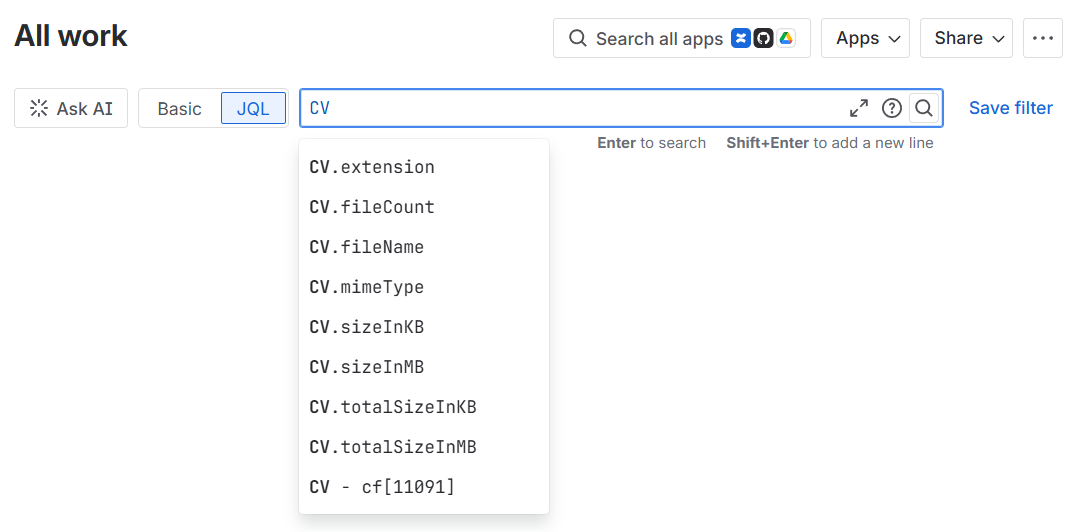
Available properties
Replace CV in the examples below with the name of your File Field.
|
Property |
Description |
Example |
|---|---|---|
|
|
File extension, without the leading dot |
|
|
|
Number of files stored in the field |
|
|
|
Name of an uploaded file |
|
|
|
MIME type of an uploaded file |
|
|
|
Size of an individual file, in kilobytes |
|
|
|
Size of an individual file, in megabytes |
|
|
|
Combined size of all files in the field, in kilobytes |
|
|
|
Combined size of all files in the field, in megabytes |
|
When the field name contains spaces, enclose it in quotation marks:
"Contract Documents".extension = "pdf"
Search by file extension
Find issues containing a PDF file:
CV.extension = "pdf"
Find issues containing a PNG or JPG image:
CV.extension IN ("png", "jpg", "jpeg")
Exclude ZIP files:
CV.extension != "zip"
Search by filename
Find issues containing a file whose name includes contract:
CV.fileName ~ "contract"
Find a file by its exact name:
CV.fileName = "signed-contract.pdf"
Exclude files whose names contain draft:
CV.fileName !~ "draft"
Search by MIME type
Find issues containing PDF documents:
CV.mimeType = "application/pdf"
Find issues containing PNG or JPEG images:
CV.mimeType IN ("image/png", "image/jpeg")
MIME type searches can be more reliable than extensions when different extensions represent the same file format.
Search by number of files
Find issues containing at least one file:
CV.fileCount > 0
Find issues containing more than one file:
CV.fileCount > 1
Find issues where the field contains exactly three files:
CV.fileCount = 3
You can also use the standard JQL syntax to find empty fields:
CV IS EMPTY
Or fields that contain a value:
CV IS NOT EMPTY
Search by individual file size
Find issues containing a file larger than 5 MB:
CV.sizeInMB > 5
Find issues containing a file between 1 MB and 10 MB:
CV.sizeInMB >= 1
AND CV.sizeInMB <= 10
The same query can be written using kilobytes:
CV.sizeInKB > 500
The sizeInKB and sizeInMB properties apply to individual files stored in the field.
Search by total file size
Find issues where all files in the field use more than 10 MB in total:
CV.totalSizeInMB > 10
Find issues where the combined size is between 1 MB and 20 MB:
CV.totalSizeInMB >= 1
AND CV.totalSizeInMB <= 20
The totalSizeInKB and totalSizeInMB properties represent the combined size of all files stored in the field.
Combine File Field properties
You can combine multiple File Field properties in the same query.
Find issues containing more than one PDF file:
CV.extension = "pdf"
AND CV.fileCount > 1
Find issues containing files larger than 5 MB, with more than 20 MB stored in total:
CV.sizeInMB > 5
AND CV.totalSizeInMB > 20
Find issues containing a signed PDF document:
CV.extension = "pdf"
AND CV.fileName ~ "signed"
Combine with standard Jira fields
File Field properties can be combined with any other JQL criteria.
Find unresolved issues containing PDF documents:
resolution IS EMPTY
AND CV.extension = "pdf"
Find service requests without any uploaded files:
project = SUPPORT
AND issuetype = "Service Request"
AND CV IS EMPTY
Find completed issues containing large files:
statusCategory = Done
AND CV.sizeInMB > 10
Find recently created issues containing contract documents:
created >= startOfMonth()
AND "Contract Documents".fileName ~ "contract"
Use File Field JQL properties in Automation
These properties can also be used in Jira Automation wherever a JQL query is supported.
For example, you can create rules that:
-
Notify users when a required document is missing.
-
Detect files exceeding a defined size.
-
Transition an issue when a specific document is uploaded.
-
Identify issues containing unsupported file types.
-
Create scheduled reports for incomplete documentation.
Example JQL condition:
"Approval Documents".fileName ~ "signed"
AND "Approval Documents".extension = "pdf"
Notes and limitations
JQL searches File Field metadata, not the contents of uploaded files. For example, you can search for a PDF by its filename, extension, MIME type, or size, but not for text contained inside the PDF.
After a file is uploaded, replaced, or deleted, Jira may need a short time to update its search index before the change is reflected in JQL results.
Need Assistance?
For support with searching on file fields, reach out to our Customer Portal.